
Appearance
(图)文生图接口文档教程
软件下载,可加入QQ群:693655685 找群资料 iKunAPI地址:https://api.monkey-tools.cn
注意图片产物链接有效期是30分钟。
为什么会失败
1、令牌错误
2、GPT封号
3、提示词违规。禁止涉政、诋毁、侮辱、暴力、恐怖、非法、色情、成人内容
4、不遵守常见格式尺寸,你别乱填 比如 1920x1080 你非填写 1919x1079
5、侵权:上海迪士尼这类
6、提示词里不要带8K什么之类的词
生图接口返回url与base64有啥区别
1、url返回的是图片会过期。免服务器带宽。
2、base64返回的是图片不会过期。但会占用服务器带宽。
我们追加了新的站点
https://img.monkey-tools.cn
访问,填入自己的令牌,就可以对话生成你需要的图片。
注意,图片生成不成功,不会扣款。如果遇到失败,请重新生成。
分组说明
1、"💚_文(图)生图_救急_2分组" 返回Url,如果4K失败会降为2K,支持最多9张参考图,不限制大小。
2、"🔵_文(图)生图_救急_1分组" 返回base64。支持做多5张图,每张似乎限制5M。
2、"🪓_文(图)生图_救急_3分组" 返回base64。
工具单独对接的话,我已经弄好到apifox上了
访问:https://ikun-api.apifox.cn 具体展示如下: 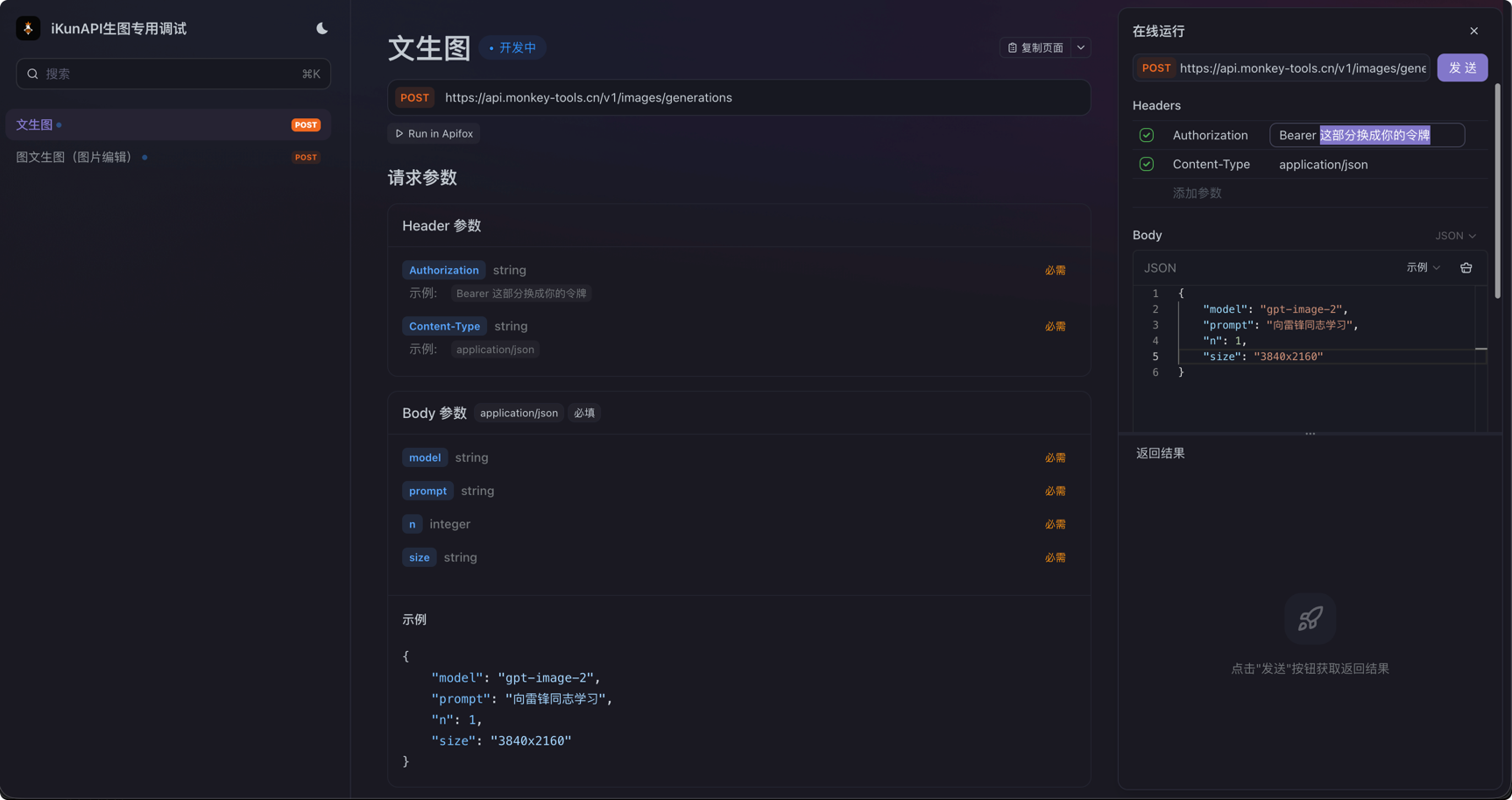
gpt-image-2
文生图接口
curl
curl --location --request POST 'https://api.monkey-tools.cn/v1/images/generations' \
--header 'Authorization: Bearer 你的令牌sk-xxxx' \
--header 'Content-Type: application/json' \
--data-raw '{
    "model": "gpt-image-2",
    "prompt": "向雷锋同志学习",
    "n": 1,
    "size": "3840x2160"
}'
响应
txt
{
    "created": 1779552057,
    "data": [
        {
            "conversation_id": "",
            "file_id": "",
            "gen_id": "",
            "id": "compat-generate-1779552057963035009-0",
            "parent_message_id": "",
            "revised_prompt": "A simple symbolic poster in the style of a clean modern socialist mural, featuring diverse people helping each other in a bright, optimistic scene, with no text.",
            "source_account_id": "8fff4c33d9c7cd7d",
            "url": "图片的地址在这里"
        }
    ],
    "usage": {
        "completion_tokens": 5,
        "input_tokens": 5,
        "output_tokens": 5,
        "prompt_tokens": 5,
        "total_tokens": 10
    }
}
取图片的url,即可,注意及时下载。超期30分钟将会无法访问文件。
如果你是postman或者apifox可以在后置脚本中使用
javascript
let json;
try {
json = pm.response.json();
} catch (e) {
pm.visualizer.set(`<pre>响应不是合法 JSON</pre>`);
return;
}
const item = json?.data?.[0];
const imageUrl = item?.url;
const b64 = item?.b64_json;
const format = (json?.output_format || "png").toLowerCase();
function escapeHtml(str) {
return String(str).replace(/[&<>"']/g, (m) => ({
"&": "&",
"<": "<",
">": ">",
'"': """,
"'": "'"
}[m]));
}
if (imageUrl) {
pm.visualizer.set(`
<html>
<body style="margin:0;padding:16px;background:#111;color:#fff;font-family:sans-serif;">
<div style="margin-bottom:12px;font-size:14px;opacity:.8;word-break:break-all;">${escapeHtml(imageUrl)}</div>
<img src="${imageUrl}" style="max-width:100%;height:auto;display:block;border-radius:8px;" />
</body>
</html>
`);
} else if (b64) {
const mime = `image/${format === "jpg" ? "jpeg" : format}`;
const dataUrl = `data:${mime};base64,${b64}`;
pm.visualizer.set(`
<html>
<body style="margin:0;padding:16px;background:#111;color:#fff;font-family:sans-serif;">
<div style="margin-bottom:12px;font-size:14px;opacity:.8;">Base64 Image Preview</div>
<img src="${dataUrl}" style="max-width:100%;height:auto;display:block;border-radius:8px;" />
</body>
</html>
`);
} else {
pm.visualizer.set(`<pre>${escapeHtml(JSON.stringify(json, null, 2))}</pre>`);
}效果是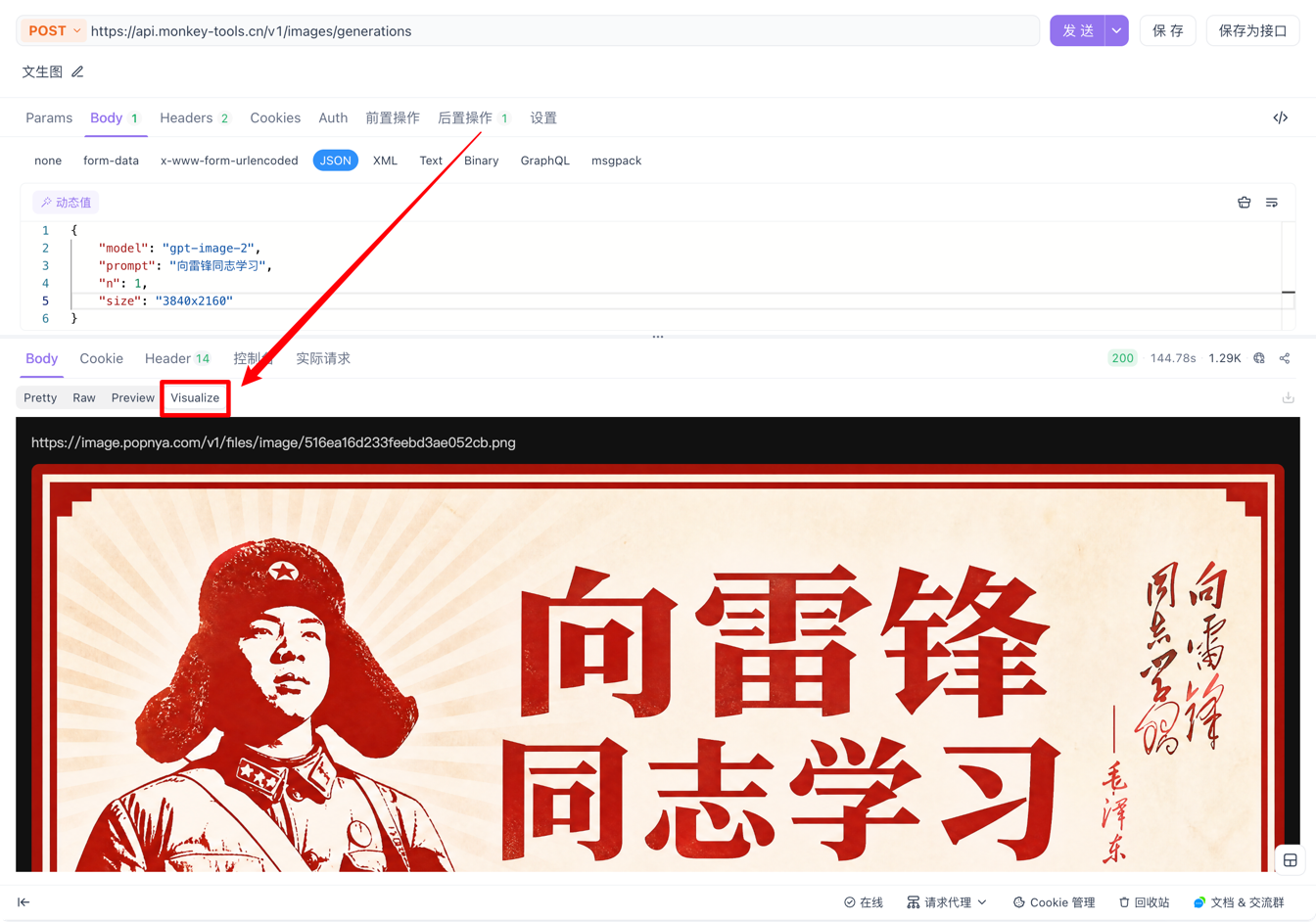
最终产物展示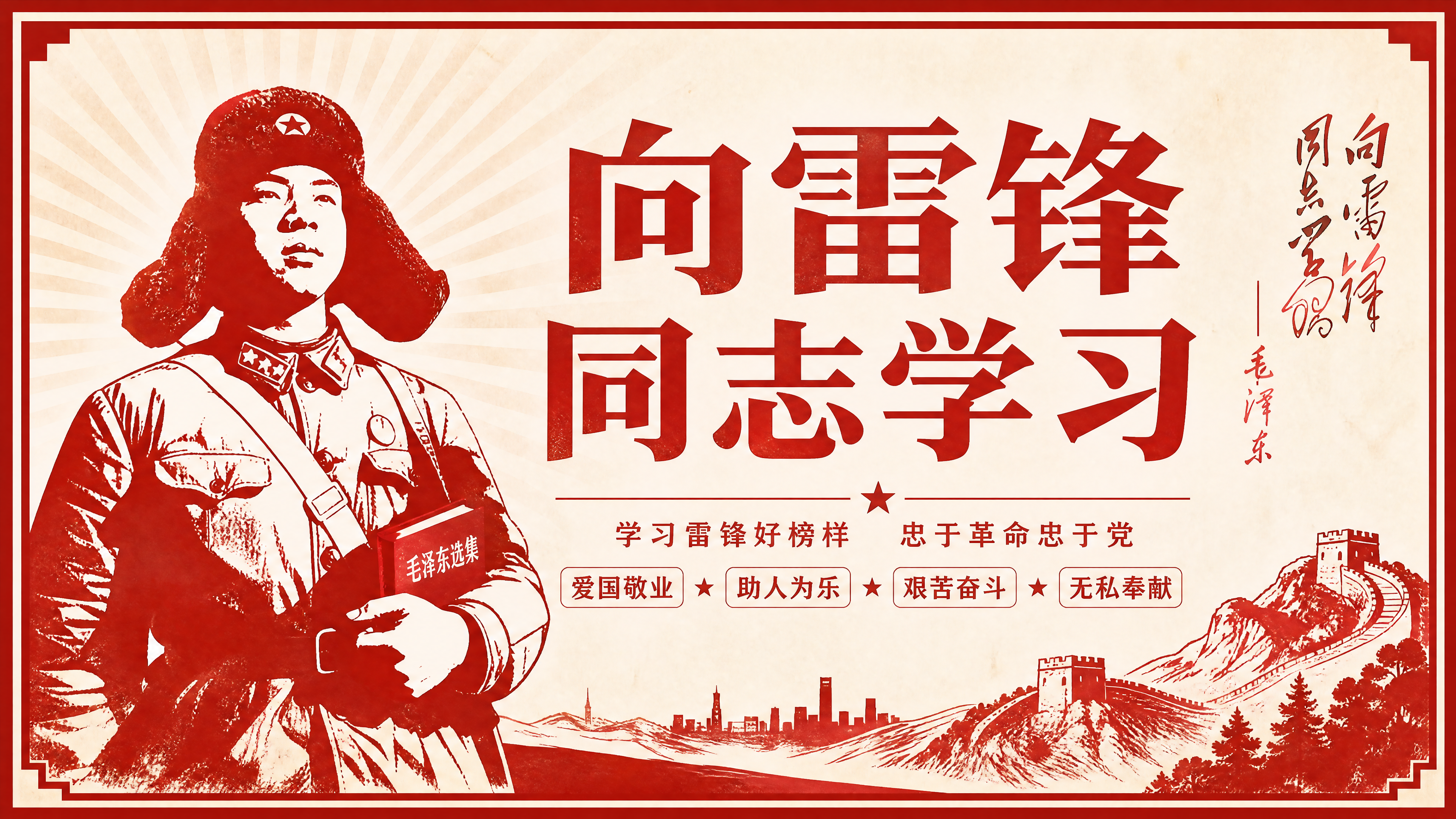
图生图教程
这里curl可上传多个文件,大家可以自行更换文件。
curl
curl --location --request POST 'https://api.monkey-tools.cn/v1/images/edits' \
--header 'Accept: */*' \
--header 'Accept-Language: zh-CN,zh;q=0.9' \
--header 'Authorization: Bearer 你的令牌' \
--header 'Connection: keep-alive' \
--form 'model="gpt-image-2"' \
--form 'prompt="参考这两张图片,生成一张新的图片,保持主要人物、风格和画面主题一致"' \
--form 'size="3840x2160"' \
--form 'output_format="png"' \
--form 'moderation="auto"' \
--form 'quality="auto"' \
--form 'stream="true"' \
--form 'partial_images="1"' \
--form 'image[]=@"/Users/xxx/Downloads/a1a1aed8bd6b5c16a0b3cb15a2ac42.jpg"' \
--form 'image[]=@"/Users/xxx/Downloads/iKunLogo.jpeg"'
产物
json
{
    "created": 1779623790,
    "data": [
        {
            "conversation_id": "",
            "file_id": "",
            "gen_id": "",
            "id": "compat-edit-1779623790455909687-0",
            "parent_message_id": "",
            "revised_prompt": "Create a new portrait image based on the two reference images: keep the same main subject as a young East Asian woman with long straight dark hair, a woven straw hat with a black band, soft beauty-filter selfie style, close-up framing, gentle blush, natural lips, white ruffled top, and a delicate gold pendant necklace. Preserve the overall aesthetic of the first image: bright indoor lighting, centered face, soft skin texture, slightly serious expression, clean background. Incorporate the visual theme of the second image subtly: a black-and-orange basketball/crown motif as a tasteful graphic element in the background or as a small decorative accent, with a modern sporty vibe. Make it look like a fresh, original selfie in the same style and theme, high-resolution, realistic, polished, with balanced composition.",
            "source_account_id": "479776315acc77aa",
            "url": "图片的地址在这里"
        }
    ],
    "usage": {
        "completion_tokens": 5,
        "input_tokens": 5,
        "output_tokens": 5,
        "prompt_tokens": 5,
        "total_tokens": 10
    }
}
这部分我就不具体展示产物了。本人测试通过。
iKun API令牌不同分组,响应结果不一样。
GPT-IMAGE-2 分组 返回的是Base64
(图)文生图 分组 返回的是URL
如果你是调用API,则需要你额外针对响应结果进行处理
Base64响应
json
{
    "created": 1779758035,
    "data": [
        {
            "b64_json": "这里放的是base64",
            "revised_prompt": "中国式公益宣传海报风格,红色主题,庄重简洁,标题文字:向雷锋同志学习。画面中心为雷锋式志愿服务形象,背景有红旗、光芒与城市公益场景,整体富有时代感与纪念意义。"
        }
    ],
    "background": "auto",
    "output_format": "png",
    "quality": "auto",
    "size": "3840x2160",
    "model": "gpt-image-2",
    "usage": {
        "input_tokens": 70,
        "input_tokens_details": {
            "image_tokens": 0,
            "text_tokens": 70
        },
        "output_tokens": 3336,
        "output_tokens_details": {
            "image_tokens": 3336,
            "text_tokens": 0
        },
        "total_tokens": 3406
    }
}
Url响应
json
{
    "created": 1779758035,
    "data": [
        {
            "url": "图片的地址在这里"
        }
    ],
    "background": "auto",
    "output_format": "png",
    "quality": "auto",
    "size": "3840x2160",
    "model": "gpt-image-2",
    "usage": {
        "input_tokens": 70,
        "input_tokens_details": {
            "image_tokens": 0,
            "text_tokens": 70
        },
        "output_tokens": 3336,
        "output_tokens_details": {
            "image_tokens": 3336,
            "text_tokens": 0
        },
        "total_tokens": 3406
    }
}